
This is an old revision of the document!
Table of Contents
— Marc Verhaar 2021/11/02 19:08
 ====== Uitreksel RHCSA 8 ======
File Maintenance Commands:
| Command | Function | Example |
|---|---|---|
| cp | Copy file | cp file1 file2 |
| rm | Remove file | rm file2 |
| mv | Move file (also rename!) | mv file /path/newfile |
| mkdir | Make directory | mkdir newdir |
| rmdir | Remove directory (must be empty!) | rm newdir |
| rm -rf | Remove file or directory | rm -rf /bin |
| chgrp | Change group of file or directory | '' sudo chgrp root file 1'' |
| chown | Change ownership of file or directory | chown user file |
chown user:group file |
||
chown -R user: dir |
Soft link vs Hard link:
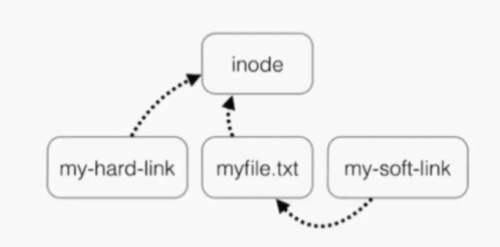
Inode:
- index position which points to data (file/directory) on drive
- Every file has an inode (Index node)
- Contains all file information except file contents and name:
- Inode number
- File size
- Owner information
- Permissions
- File type
- Number of links
- etc
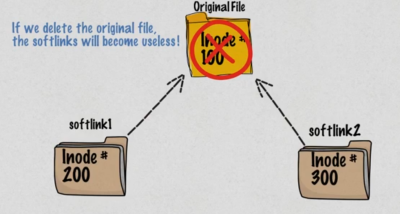
Soft link:
- Same as windows shortcut
- Can span over disks/partitions/lvms
- Aka Symbolic link
- Different inode number
- Smaller file size
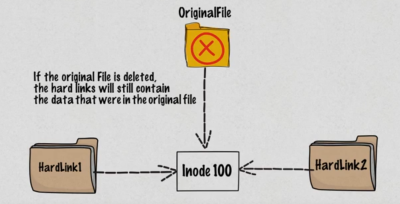
Hard link:
- Different name of the same file
- Same file size
- Same inode number
- Can not span over disks/partitions/lvms (i.e. hard links only work within same partition)
This means:
- removing the target will render the soft link useless (cat softlink will give an error)
- removing the target will not remove a hard link (cat hardlink will show content of original file)
| Command | Function | Example |
|---|---|---|
| ln | create a hardlink | ln target linkname |
| ln -s | create a soft link | ln -s target linkname |
| ls -i | show files with inode numbers | ls -li |
Example:
''''
touch original
echo “some stuff” > original
ln -s original softlink
ln original hardlink
ls -li
46271969 -rw-rw-r– 2 marcv marcv 24 Nov 2 20:54 hardlink
46271969 -rw-rw-r– 2 marcv marcv 24 Nov 2 20:54 original
46271970 lrwxrwxrwx 1 marcv marcv 8 Nov 2 20:54 softlink → original
rm original
ls -l
-rw-rw-r– 1 marcv marcv 24 Nov 2 20:43 hardlink
lrwxrwxrwx 1 marcv marcv 8 Nov 2 20:44 softlink → original (broken link)
''''
Redirecting:
Standard redirecting:
There are 3 redirects in Linux:
- stdin: standard input has file descriptor number as 0 (keyboard, mouse, ..?)
- stdout: standard output has file descriptor number as 1 (monitor)
- stderr: standard error has file descriptor number as 2 (monitor)
We can redirect these output using >, <, and 2>:
| Command | Redirects |
|---|---|
ls -l > output | output to “output” (not overrides output to stdout which is terminal) |
ls -l » output | same but appends to existing content instead of overwriting |
| '' cat < file'' | redirect content of file to cat (quite useless as cat file will do the same) |
mail user@here.nl < content | using mailprogram, send content |
ls -l /root 2> errorfile | redirect errors to errorfile (valid output to stdout) |
Using redirect in combination with EOF:
Assign multi-line string to a shell variable:
sql=$(cat <<EOF
SELECT foo, bar FROM db
WHERE foo='baz'
EOF
)
The $sql variable now holds the new-line characters too. You can verify with echo -e “$sql”
Pass multi-line string to a file in Bash:
cat <<EOF > print.sh
#!/bin/bash
echo \$PWD
echo $PWD
EOF
The print.sh file now contains:
#!/bin/bash
echo $PWD
echo /home/user
Pass multi-line string to a pipe in Bash:
cat <<EOF | grep 'b' | tee b.txt
foo
bar
baz
EOF
The b.txt file contains bar and baz lines. The same output is printed to stdout.
Pipes (|):
- A pipe is used by the shell to connect the output of one command directly to the input of another command.
- The symbol is the vertical bar (|)
- Syntax: command1 [arguments] | command2 [arguments] | command3 [arguments] etc
| command | what it does |
|---|---|
ls -ltr | less | feed less with output of ls -ltr |
find . *file | grep name | find files and grep in filenames(!) |
cat file* | grep string | cat files and grep inside content(!) This can also be done using grep -R string ./* |
Getting help:
- whatis command
- command –help
- man command
- help command
File editors:
- vi
- ed
- ex
- emacs
- pico
- vim
For RHCSA you'll be using vi because it's present on almost all *nix systems.
Common keys in command mode:
- i for insert
- a for append (A for append at end of line)
- o for new line edit mode
- r for replace
- y for yank (copy)
- d for delete / cut
- p for paste
- q for quit
- h for left
- j for down
- k for up
- l for right
- dd: cut line
- dw: cut word
- 30dd: cut 30 lines
- u: undo
- 3dw: cut 3 words
- x: cut character
- 3x: ?
- r-character: replace current character with new
User account management:
commands:
- useradd: add user
- groupadd: add group
- userdel: delete user
- groupdel: delete group
- usermod: modify user
- chage: change password change requirements (per user)
files:
- /etc/passwd: contains user information
- /etc/group: contains group information
- /etc/shadow: stores actual password in encrypted format and password age (chage)
- /etc/login.defs: contains system-wide default password policy, also contains UID policy, umask and other stuff
Some examples:
| Command | What it does |
|---|---|
| useradd -d /homedir -g group username | add user, assign to group and define homedir |
| usermod -a -G wheel user | add user to additional group wheel |
| useradd -r nonuser | create system account |
| useradd -s /bin/zsh user | create user and define shell |
| chage -m 5 user | user can change password in 5 days |
| chage -M 90 -W 70 user | user must change password every 90 days and gets warning 7 days prior |
| chage -I 7 user | account will be disabled 7 days after password expires |
Switch users and sudo access:
Commands:
- sudo su - username: switch to username
- sudo command: execute command as root
- visudo: edit /etc/sudoers which defines what users can elevate which privileges
Log monitoring:
Log directory is /var/log/ (unless specified other per application)
Accurate system time is critical!
RedHat 8 uses NTP for time synchronization.
- boot.log (overwritten on each (re)boot)
- chrony (NTP)
- cron
- maillog (sendmail log)
- secure: records login attempts (= on RedHat, auth.log on Debian)
- messages (no 1 for troublesshooting, syslog on Debian)
- httpd
- dmesg (on hardware, also to be viewed using command
dmesg) - firewalld
- etc