
This is an old revision of the document!
Table of Contents
— Marc Verhaar 2023/02/21 10:26
AWS Certified Solutions Architect
 AWS has hundreds of whitepapers available!
For this exam the most important whitepaper it this one!
The default region is US-East-1. This is also the region where new services will be deployed first! Also when creating services like EC2 or S3, these are created within the region that you are in at the moment of creating!
Well-Architected Framework
There are 6 pillars of the well-architected framework:
- Operational Excellence: running and monitoring systems to deliver business value, and continually improving processes and procedures.
- Performance Efficiency: using IT and computing resources efficiently
- Security: protecting information and systems
- Cost Optimization: avoiding unnecessary costs
- Reliability: ensuring a workload performs its intended function correctly and consistently when it's expected to
- Sustainability: minimizing the environmental impacts of running cloud workloads
Availability Zones and Regions
In this section:
- AWS Global Infrastructure
- Availability Zones
- Data Centers
- Regions
- Edge Locations
- The AWS Management Console
At the moment there are 24 regions and 77 availability zones.
A Region is a geographical location which consists of 2 or more Availability Zones(AZs).
An Availability Zone is a data center or multiple data centers located close (100km or less) together, each with redundant power, networking and connectivity.
Edge locations are endpoints for AWS used for caching (CloudFront, Amazon's CDN). More than 215 Edge locations at the moment.
Ownership and Responsibility
Both AWS and the customer have responsibilities using the AWS cloud. These responsibilities are defined in the Shared Responsibility Model:
AWS Responsibilities
AWS is responsible for the Security OF the Cloud:
- SOFTWARE:
- Compute
- Storage
- Database
- Networking
- HARDWARE/AWS GLOBAL INFRASTRUCTURE:
- Regions
- Availability Zones
- Edge Locations
Customer Responsibilities
The Customer is responsible for the Security IN the Cloud:
- Customer Data
- Platform, Applications, Identity & Access Management
- Operating Systems, Network & Firewall Configuration
- Client-Side Encryption & Data Integrity Authentication
- Server_Side Encryption (File System and/or Data)
- Networking Traffic Protection (Encryption, Integrity, Identity)
Ask yourself if you can manage it in the AWS Management Console:
- If you can , you are probably responsible.
- Security Groups, IAM users, Patching EC2 operating systems, patching databases running on EC2, etc
- If not, AWS is likely responsible.
- Management of data centers, security cameras, cabliung, patching RDS OS, etc.
- Encryption is a shared responsibility
Compute, Storage, Databases, and Networking
Compute
- EC2 (Virtual Server)
- Lambda (Serverless compute)
- Elastic Beanstalk (provisioning engine for automating deployments using code)
Storage
- S3 (Simple Storage Service)
- EBS (Elastic Block Store, virtual harddrive)
- EFS (Elastic File Service, storing files centrally)
- FSx
- Storage Gateway
Databases
- RDS (Relational Database Services)
- DynamoDB (Non-relational Database)
- Redshift
Networking
- VPC (Virtual Private Cloud)
- Direct Connect
- Route 53 (DNS)
- API Gateway
- AWS Global Accelerator
Identity Access Management (IAM)
IAM does NOT require region selection! It's management is valid for global access.
IAM Functions
IAM allows you to manage users and their level of access to the AWS console:
- Create users and grant permissions to those users.
- Create groups and roles.
- Control access to AWS resources
IAM Root Account
The root account is the email address you used to sign up for AWS. The root account has full administrative access to AWS. For this reason it is important to secure this account using a strong password and:
- MFA (Multi Factor Authentication)
- Create an admin group for your administrators and assign the appropriate permissions to this group.
- Create user accounts for you administrators
- Add users to the admin group
Controlling Permissions using IAM
We assign permissions using policy documents which are made up of JSON.
{
    "Version": "2012-10-17",
    "Statement": [
        {
            "Effect": "Allow",
            "Action": "*",
            "Resource": "*",
        }
    ]
}
The above example is typical for an admin account: allow everything on everything!
Another interesting policy account is that of the PowerUser which grants access to everything except management of Users and Groups:
{
    "Version": "2012-10-17",
    "Statement": [
        {
            "Effect": "Allow",
            "NotAction": [
                "iam:*",
                "organizations:*",
                "account:*"
            ],
            "Resource": "*"
        },
        {
            "Effect": "Allow",
            "Action": [
                "iam:CreateServiceLinkedRole",
                "iam:DeleteServiceLinkedRole",
                "iam:ListRoles",
                "organizations:DescribeOrganization",
                "account:ListRegions"
            ],
            "Resource": "*"
        }
    ]
}
Policy Documents can be assigned to:
- Groups
- Users
- Roles
You would not assign permissions to users as this becomes hard to manage. Instead assign permissions to a group and add the user to the group. The user then inherits the permissions through the group he is assigned to.
Policy Documents can be managed and created from the IAM console. When creating a policy document you have the option to create a JSON file yourself or use a visual editor as provided by AWS.
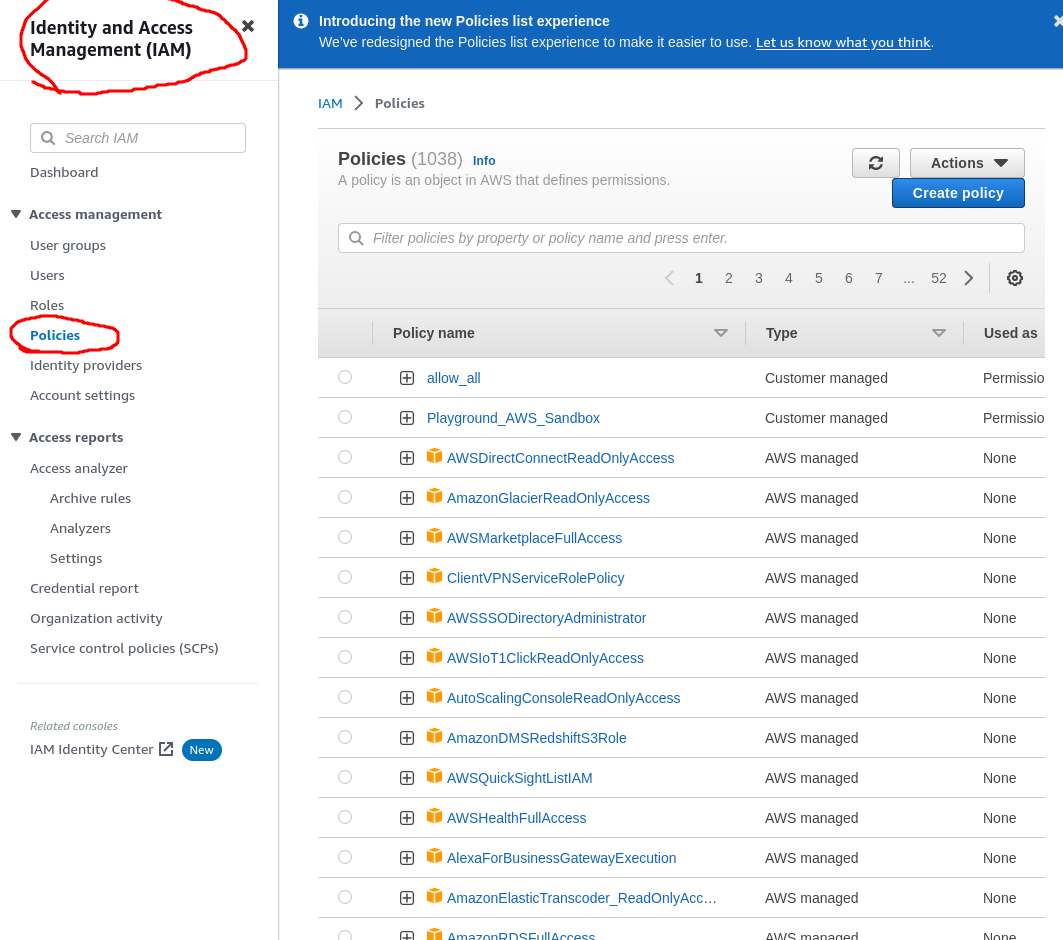
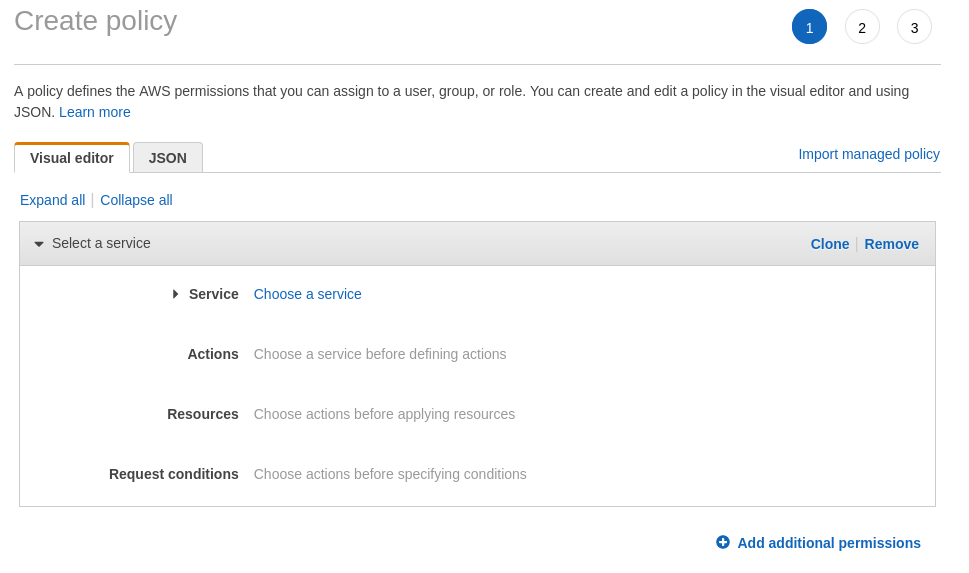
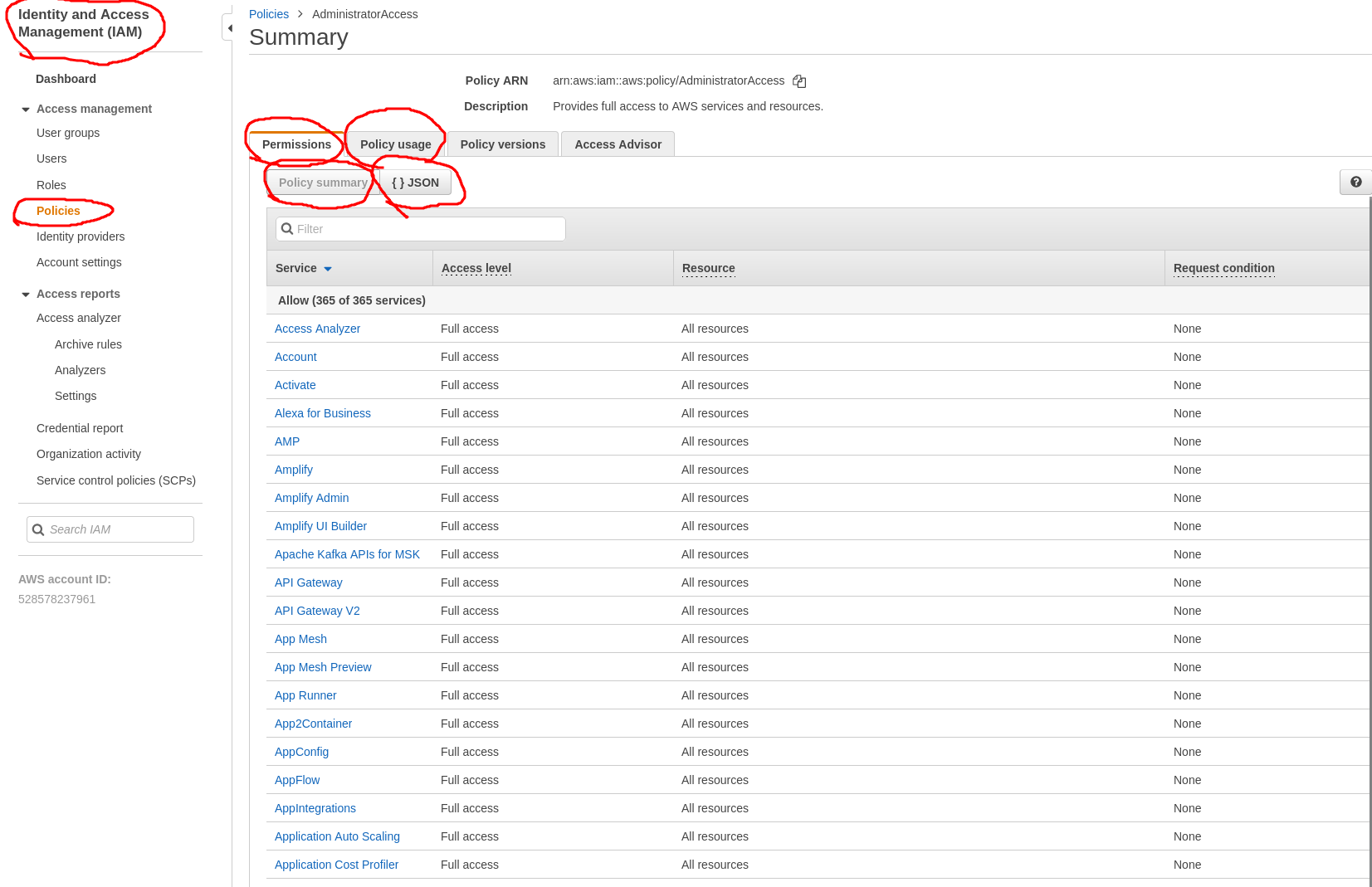
Policy Documents that are already created, either by AWS or yourself, can be inspected as well.
IAM Building Blocks
- Users: a physical person
- Groups: Functions, such as administrators, developers, etc. Contains users
- Roles: Internal usage within AWS, allows 1 part of AWS to access another part of AWS (i.e. an S3 bucket that needs to be available to an EC2 instance)
Creating a User
- Using the IAM console, create user
- Fill in user name
- Determine access type:
- Programmatic access will create an access key ID and secret access key for the AWS API, CLI, SDK and other development tools. Apparently this no longer exists as an option! After creating the user you now need to generate access keys by hand
- AWS Management Console: Enables a password that allows users to sign-in to the AWS Management Console. You also need to choose between auto-generated password or custom password, and if the user must create a new password at the 1st sign-in.
- Add user to group (create group if needed)
- Add tags if needed, for example:
- Department - Admins
- Employee_ID - 12345
- etc
- Review and create user
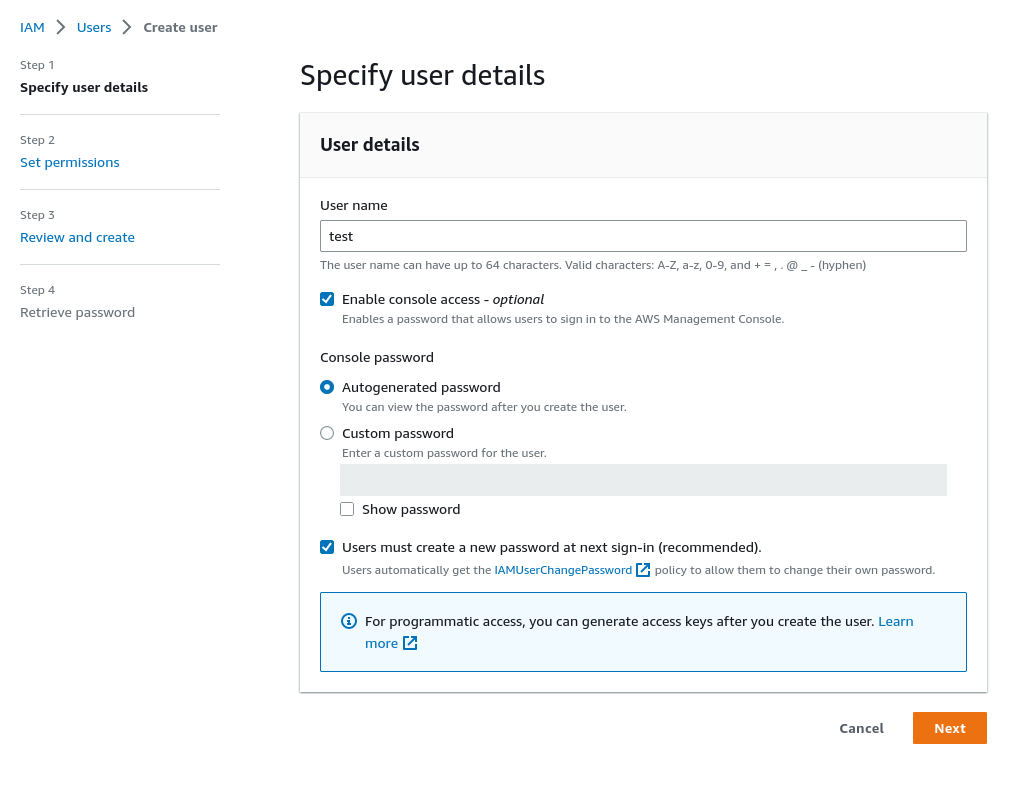
Password Policy
The default password policy can be found on the IAM page under Account settings. It defaults to:
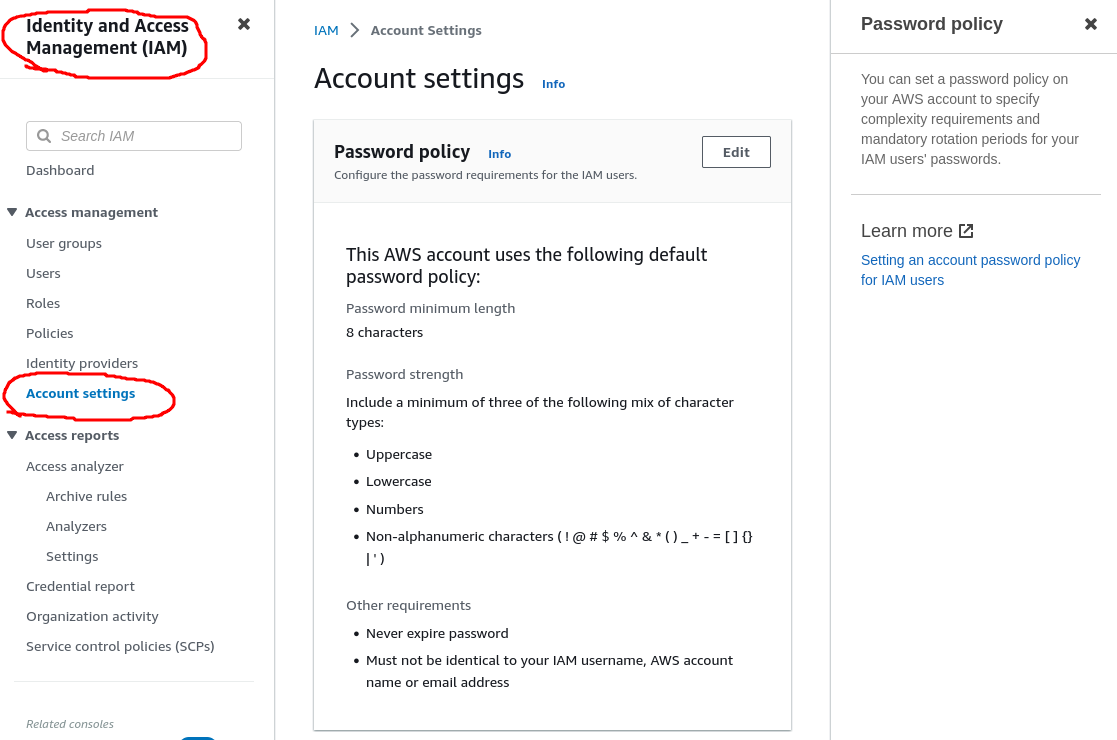
It is possible to change to a custom policy:
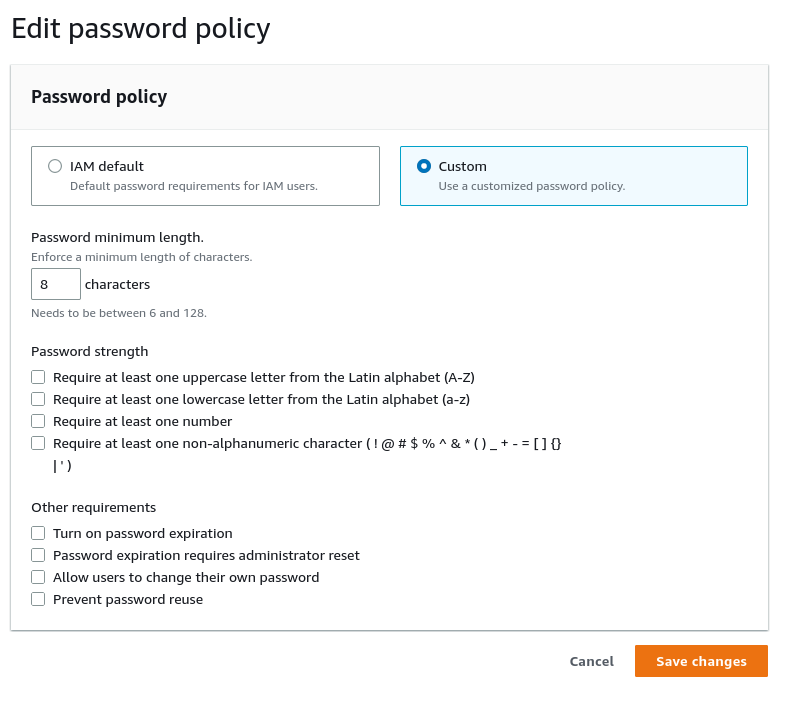
This will only impact new users and existing users changing their passwords
Identity Providers
This provides an option to use SSO (Single Sign On) using:
- SAML; your Windows AD (Active Directory) server. You need to create a trust between your AWS account and Active Directory Federation Services or
- OpenID Connect
IAM Exam tips
- Assign permission using IAM Policy Documents consisting of JSON (JavaScript Object Notation)
- Assign policy documents to groups when possible
- 1 User == 1 Physical person, do NOT share accounts
- Use the principle of least privilege meaning you assign a user the minimum amount of privileges they need to do their job
- Following the principle of least privilege, a newly created user does NOT have ANY permissions if not assigned by an administrator
- Access Key ID and Secret Access Key can only be viewed upon creation so be sure to store them in a safe place